Plasma Whole Genome Sequencing (pWGS) Reports
Djerba INI Configuration
To create a pWGS report, we run Djerba with two pWGS plugins enabled:
pwgs.sampleperforms sample identification and QC checks,
pwgs.analysisperforms analysis of mrdetect workflow outputs
Information is obtained either from one of two Data Sources: the Requisition (Req) system or Dimsum.
The pwgs plugins require the following information to be populated into the .ini file:
Plugin |
Parameter |
Source |
Description |
Example |
|---|---|---|---|---|
Core |
author |
bambooHR |
Your name |
Rosalind Franklin |
pwgs_cardea_helper |
requisition_id |
Dimsum |
The id of the requisition |
PWGVAL_011418_Ct |
pwgs.case_overview |
primary_cancer |
requisition system |
Primary cancer in req system |
Pancreatic Adenocarcinoma |
wgs_report_id |
requisition system |
associated WG(T)S report |
OCT-01-1328_Ut_P-v2 |
|
requisition approved |
requisition system |
date of approval for the req |
2023/10/10 |
|
supplement.body |
assay |
Dimsum |
assay short name |
PWGS |
pwgs_provenance_helper |
No input parameters required |
|||
pwgs.sample |
No input parameters required |
|||
pwgs.summary |
No input parameters required |
|||
pwgs.analysis |
No input parameters required |
|||
Interim Report Generation
The Djerba report html can be created with the command:
$ djerba.py report --ini config.ini --out-dir report
The report html will be of the name ${group_id)_report.clinical.html.
Review Sample Quality
The sample QC section has three metrics to be reviewed by CGI staff: median insert size, mean genome-wide coverage and primary SNVs, as shown in screenshot below:
Coverage
Mean deduplicate coverage should be ≥30X (40X target). Mean deduplicated coverage is automatically pulled into Djerba from QC-ETL. Samples under 30X deduplicated should be topped up by TGL.
Primary SNVs
The plasma whole genome sequencing assay assumes the WGS or WGTS (40X or 80X) assay has been completed (hereafter, this family of assays are referred to collectively as ‘WGS’).
The WGS report must be completed and the Djerba working directory be accessible on the cluster.
Assay calibration showed a minimum requirement of 4,000 candidate SNVs in WGS report for reliable and replicable results; the pWGS assay should not be run when the primary tumour has less than 4,000 SNVs as per the current validation report. Assay requisitioners have been informed of this requirement and that number is included in WGS reports; cases where the 4,000 SNV threshold is not met will be failed (see Failed pWGS Reports).
Additionally, cases will also be failed if tumor purity is below the 30% threshold, even if the SNV count exceeds 4,000.
Median Insert Size
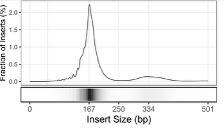
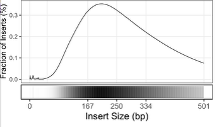
We set an upper limit to the median insert size (see QM-24: Quality Control and Calibration for cutoff value). cfDNA samples have a distinct insert size distribution that can be used to distinguish them from either normal (buffy coat) or primary tumour tissue samples with DNA fragmented by sonication. Median insert size can therefore be used to detect a swap between (for example) cfDNA and buffy coat. Libraries where the median insert size is higher than the threshold should most commonly be failed, however, if the median insert size value for a case is just slightly above the threshold, the insert size distribution can be visualized to confirm how much higher the median is than 167 bp and the sample rescued manually. Insert size distribution can be found in insert_size_distribution.svg and the figure below is to be used to guide decisions:
|
|
|---|---|
PASS |
FAIL |
The distribution is very narrow and centered at 167 bp with a second very low peak at 334 (167 x 2). |
The distribution is wide, centered near 250 bp and has some fragments larger than 500 bp. |
Updating QCs
Sign off on the “Informatics Review” in Dimsum according to the QM-036. Quality Control Approval Procedure.
Generate Draft Report
If the report passes all QC metrics and all information is present, the report is converted from html to pdf, either using manually or using Djerba:
$ djerba.py render --json report/${group_id)report.json --out-dir report --pdf
Continue to Review the Draft Report ➡️
Change Log
June CR-119 update (#14) by Morgan Taschuk at 2026-07-21 19:22:33
* Remove references to mini-Djerba * Improve changelogs by pulling in the actual changes for each page with sphinx-git
Add changelogs to every page; add a note about identical amended reports for CAPA-221 by Morgan Taschuk at 2025-09-15 20:10:46
Reorganized so each SOP has its own section by Morgan Taschuk at 2025-08-18 19:08:34